
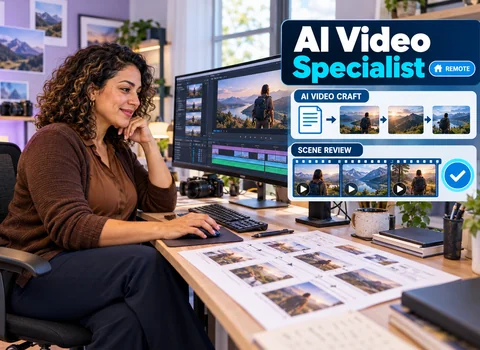
A brand script page usually comes in two columns. The left side holds each spoken line, word for word: "Your first coffee of the day should taste like this." The right side says what the viewer sees at that moment: presenter avatar, mid shot; generated scene of morning light across a kitchen counter; product close-up on the bag; caption with the offer. Turning that page into a finished cut that still sounds and looks like the brand is the work here. Online AI video specialist jobs like this one accept people from anywhere in the world; this post is part-time and fully remote, with pay of $22 per hour in USD. No degree is required. Your portfolio of AI-generated or edited videos carries the most weight, alongside working skill in Runway, HeyGen, Synthesia and CapCut.
What follows tracks one brand project in working order, then the computer, the money and the career.
Open the brand guidelines first. Note the logo safe zone, the type family for on-screen text, the colour values, and the tone rules, such as "never sarcastic" or "always say members, not customers". Then read the script with those rules beside you and mark every line that conflicts. A script that promises "the best coffee in the world" may break the brand's own claims policy, and it is much cheaper to ask now than after rendering.
Send open questions in one message: presenter style, length, platforms and who signs off.
Basic scripting and storyboarding are part of the AI video specialist job description, and this is where they earn their keep. Sketch each row of the script as a box: a stick figure for the avatar, a quick note for a generated scene, a rectangle for the product. Timing matters more than drawing. Read each line aloud with a stopwatch and write the seconds under its frame, because a line that takes six seconds to say cannot sit over a scene you planned for two.
Send the storyboard to the client before generating anything. Changes here are free; changes after a render cost credits and hours.
Avatar rows are built in HeyGen or Synthesia, whichever the client prefers. Stock avatars and stock voices come licensed through the platform, so your check is whether the plan covers the brand's commercial use. Custom avatars and cloned voices are a different matter. They are only made with the documented consent of the actual person, through the platform's own verification steps, and only with licensed voices. If a client asks for a famous face, a competitor's spokesperson or a staff member who has not agreed, the answer is no.
Then listen for the brand's pronunciation. Product names, founder names and place names often need phonetic spellings or a pronunciation entry.
The generated-scene rows go to Runway. Write the prompt from the storyboard note and the brand book together: the light, the setting, the camera movement and the palette. "Slow push-in, warm morning light, pale oak counter, steam rising from a ceramic cup" is closer to usable than "nice kitchen". Save every prompt in the project notes so a revision weeks later can match.
Keep the product itself out of generated shots unless the client explicitly approves. Generated footage can misdraw a label or invent a feature. Use the client's real product photography for close-ups.
CapCut is where the two columns meet. Lay the voice track down first, place avatar clips and Runway scenes against it, then drop in product shots. Brand fonts and colours go into a saved template so every future video in the series matches.
Agree the number of revision rounds before you start, and ask for all notes from one person in one pass. A note like "make it feel more premium" needs translating into a concrete proposal: slower cuts, more white space, a deeper voice read. Log every change with its timecode. When a note conflicts with the brand guidelines, point to the page politely and let the client decide.
Most brands want the same idea in several shapes. A vertical cut for Reels, TikTok and Shorts, a square for feeds, and a horizontal version for the website or YouTube. Reframe each one rather than cropping blindly, since the avatar's face or the product can fall out of frame. Check the caption safe area for each format, confirm length limits, and name files so a social manager can tell them apart at a glance. Keep project files for quick re-exports.
Runway, HeyGen and Synthesia render on their own servers, so the heavy generation does not depend on your machine. Editing does. In general terms you need a recent processor, enough memory to play a timeline without stutter, solid-state storage with room for footage, and a capable graphics card for smooth previews and faster exports. If your hardware is modest, cloud credits or cloud rendering can fill the gap. A fast, steady internet connection matters as much as the GPU, because you will upload and download large files daily. Fluent English rounds out the requirements.
Expect to pay for your own subscriptions in most freelance setups, and check whether a free tier adds watermarks or blocks commercial use. Licensing of AI output depends on each tool's current terms and your plan, so read them before you deliver anything to a brand.
AI video specialist jobs for freshers, and work for people with no client history yet, are reachable because the portfolio does the convincing. Invent a brand: a name, a three-line style guide, two colours and a product. Write a short two-column script for it and take it through every stage above. Then label it clearly on your reel as a spec project for a fictional brand, so nobody mistakes it for paid client work. Two or three in different tones show the AI video specialist skills a brand looks for.
If you want structure, an AI video specialist course from a tool maker's own learning pages or a general editing class can help, especially with pacing and sound. Pick one that ends in finished videos you can show.
Freelance AI video specialist jobs commonly appear on Upwork, Fiverr and similar marketplaces. On Upwork you reply to brand posts with a short note and the sample closest to their product category. On Fiverr you list a defined package, for example one script turned into a captioned video plus two platform versions. Quoted as an AI video specialist salary per hour, the $22 rate on this listing fits hourly contracts best; on fixed-price packages, time yourself so you know your real rate. Part-time AI video specialist jobs carry no promise of steady hours or income, and marketplace rules on labelling AI content change, so reread them before you post.
A traditional video editor mostly shapes footage a crew has already shot. A specialist in this role often starts from a script and creates the pictures, so prompting, avatar direction and brand checking take as much time as cutting. Editors who add these tools can cross over quickly.
Is it sustainable? Honestly, the tools will keep changing and simple clips will get easier for brands to make themselves. The parts that hold value are judgement: knowing a brand's voice, catching a wrong claim, handling consent properly and delivering clean files on time. Build those and the specific software matters less.