
The photo arrived on a Tuesday. A customer had laid a black tee flat on her bed, and right across the chest sat a cute retro cat illustration framed by a faint white rectangle, like a sticker someone forgot to peel. Zoom in and the cat's whiskers were soft and blurry at the edges. Two mistakes, one refund: the PNG had a solid background instead of a transparent one, and the artwork had been stretched up from a small web image. Online print on demand designer jobs like this one are largely about making sure that photo never gets taken.
Returns are useful because they show exactly where the process broke. In the cat case, the design itself was fine. The file was the problem, and the file is the part beginners skip because it's invisible on screen. Your monitor shows a white box as "nothing" when you preview on a white canvas. A printer reads it as ink. That is why this role involves as much file checking as drawing.
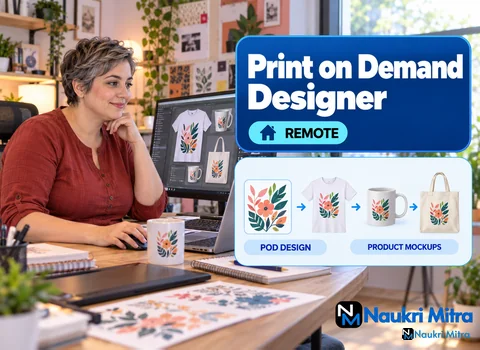
Here is the plain print on demand designer job description for this opening. You'll design T-shirt, mug and tote artwork in Canva, Kittl or Illustrator, built around trending niches and themes a client gives you. You prepare high-resolution transparent files to Printful specs, build product mockups, and check each design for trademark issues before it goes up for sale.
A common follow-up is how this differs from a general graphic designer. A graphic designer might spend a week on a brand identity. A merch designer works in smaller, faster units: a phrase, an illustration, a layout that reads from six feet away on a moving chest.
Good designs start with a narrow audience. "Dog lovers" is crowded. "People who own retired greyhounds and still talk about racing stripes" is a niche. Before opening any app, spend twenty minutes on research. Scroll marketplace search results for the niche, note which phrases repeat, look at what the reviews complain about, and check whether a trend is climbing or already stale.
Write down three to five angles: a pun, an illustration idea, a quote format. When a client hands you the theme, find the version that hasn't been done to death.
Skipping this step can get designs removed or a seller account suspended. Catchphrases, team names, character likenesses, song lyrics and brand logos can be protected, and a phrase that looks generic is sometimes registered for clothing.
The habit worth building is simple: before you design around a phrase, search it in the public trademark database for the country you sell in, and look at whether it is registered for apparel or similar goods. Avoid fan art of characters you don't own. Nothing here is legal advice, and when a client wants something borderline, flag it and let them decide with proper counsel. It is far easier to raise a concern before twenty mockups exist.
Any of the three tools named in the listing will do the job if you know its limits. Canva is quick for type-led designs and simple layouts. Kittl is handy for vintage-style lettering and badge layouts, which are common on tees. Illustrator gives you vector control, which matters when a client wants the same art on a small mug and a large back print.
A few habits that keep the work clean: design at full print size from the start, keep text as outlines or check the font licence allows commercial use, and limit thin hairline strokes, which can break up on fabric.
A common target is 300 DPI at the final printed size, though you should check what your provider currently recommends. A design built at 72 DPI and scaled up is how you get those fuzzy cat whiskers. Export as a PNG with a transparent background, and turn on the checkerboard preview to confirm there is no stray white fill hiding behind the art.
Then there is the print area, the zone a provider can physically print on a given product. It differs between a standard tee, a kids' tee, a tote and a mug, and providers update their templates. Download the current template for each product from your provider rather than trusting a size you remember from last year.
Once the file is ready, Printful's mockup generator places it on product photos so buyers can picture it. On a shirt, a design that sits too low ends up near the stomach; most front prints look best a few inches below the collar.
Mugs are trickier. The print area wraps around the cup, so a design centred on the file can end up facing the drinker instead of everyone across the table, and a right-handed holder sees one side while a left-handed one sees the other. Many sellers print the design twice, once on each side. Always preview the handle position before approving.
Clients often want a set rather than one design: five variations on a niche, each on two or three products. Batch the work. Research once, draft all the concepts, then export everything together.
Name files so anyone can find them in six months. Something like greyhound-retired-racer_tee-front_dark_v2.png tells you the niche, the product, the shirt colour it was made for and the version. A file called "final_FINAL_new.png" tells you nothing and makes it easy to upload the wrong version.
The listing is clear that no degree is needed and that sample designs that sell are the best proof. So among print on demand designer jobs for freshers, this one is fairly open. For how to become a print on demand designer with no client history, the method is to build the evidence yourself: pick two niches, make six designs each, run them through mockups, and present them as a small case study showing the niche, the reasoning and the trademark check.
If you have actual sales from your own shop, mention them honestly. If you don't, strong mockups plus clean source files still show the core print on demand designer skills: commercial taste, tool fluency and print-ready output. For roles that ask for no prior experience, that kind of portfolio is usually what gets you shortlisted.
The rate is USD 25 per hour, on a part-time listing. That figure is the print on demand designer salary for this opening, quoted as an hourly rate, so treat any print on demand designer salary per hour you see elsewhere as a separate market and not a promise about this one. The listing does not set fixed weekly hours or project volume, so ask about expected workload before you start.
Nothing ties it to a location and anyone in any country can apply, so it is a genuine print on demand designer work from home position. The format may suit people looking for part time print on demand designer jobs alongside study or another role, and those who already take freelance print on demand designer jobs and want hourly work.
Before applying, tidy three things. First, your portfolio: eight to twelve of your best mockups, each with the source PNG available on request. Second, your print on demand designer resume: one page, tools listed by name, and a line about how you handle file specs and trademark checks. Third, prepare for print on demand designer interview questions, for example fixing a design that printed with a white box, or explaining your niche research.
A print on demand designer course or a print on demand designer certification is optional here. The provider's own help pages, free tool tutorials and practice batches will teach you more. Applying here costs nothing; real employers never ask applicants for money. Upload your samples and say which design apps you open most often.